View Funnel reports
Funnel reports aggregate activity for the entire Funnel and break it down by step. Reports help you observe the journey, but they do not replace checking payment or fulfillment results for individual transactions.
Open the report
In the Funnel list, open the Funnel menu and select Reports. Select a start date, an end date, and Apply to change the data range.
Key metrics
| Metric | Meaning |
|---|---|
| Page views | The total number of times steps were opened; one visitor can create multiple views. |
| Unique visitors | The number of distinct browsing sessions in the date range. |
| Signups | The number of recorded opt-in conversions. |
| Add to cart | The number of add-to-cart events; one visitor can create multiple events. |
| Purchases | The number of recorded purchase conversions. |
| Revenue | The total value of purchase conversions, separated by currency. |
| Conversion rate | All recorded conversions divided by the number of unique visitors. |
Why can the conversion rate exceed 100%?
A “conversion” here is not only a purchase. The report adds conversion events such as signups, surveys, adding to cart, and purchases, then divides that total by the number of unique visitors. One visitor can create multiple events, so the rate can exceed 100%. This is not the percentage of visitors who purchased.
If there are no unique visitors, the rate is displayed as 0%.
Chart and step details
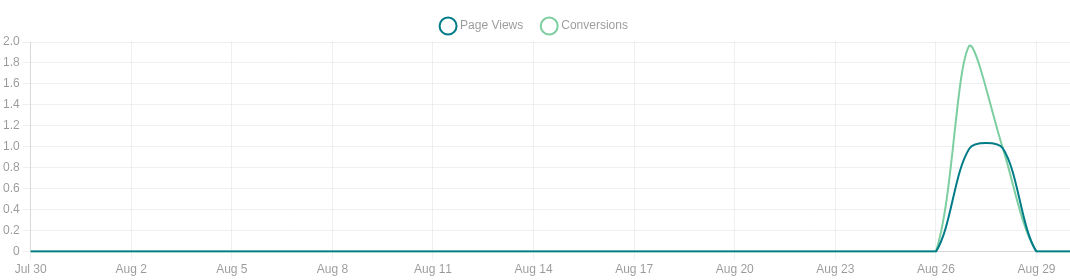
The Views & Conversions chart shows activity by day. The Step details table displays views, unique visitors, conversions, and the rate for each step.
A step's rate equals the number of conversions at that step divided by the step's unique visitors. As with the rate for the entire Funnel, one visitor can create multiple conversions.
Funnel flow and drop-off rate
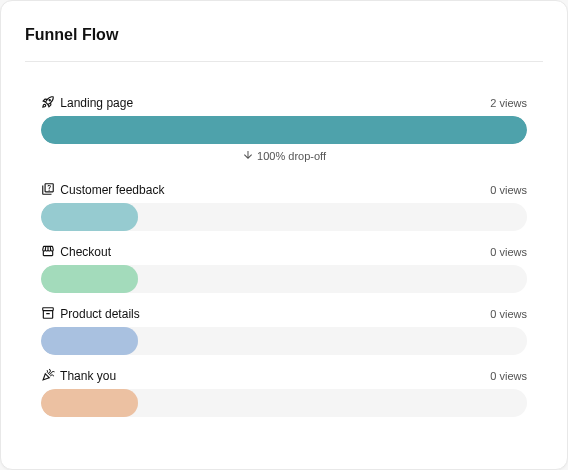
The Funnel flow compares views across steps in their current order. The drop-off rate between two steps is calculated from the difference in their view counts.
This does not track each individual person from the previous step to the next. Visitors may enter a step directly, reload the page, or return through another link; therefore, the drop-off rate can be negative when a later step has more views than the previous step.
Traffic sources and devices
The report displays top referral sources and device groups based on recorded views. A view without a referrer does not provide complete source information.
You can select the views or unique visitors card to open a detailed list, search, and paginate through recorded activity.
Transaction value and revenue
Mailix does not combine different currencies. If the Funnel has transactions in multiple currencies, the report displays separate groups.
Note: Revenue is the total value of recorded purchase conversions. This metric does not guarantee that funds reached the bank, were reconciled, or were not refunded. Compare it with the Sales tab and the payment method.
The main report does not include an average order value metric, product performance table, or survey results. Survey results are viewed from the Survey step itself.
When is data updated?
The report reads activity recorded when you open it or apply a date range. There is no label promising real-time updates and no separate refresh button. If new activity just occurred, reload the page; Mailix does not publish a fixed update interval here.
Effects of editing and deletion
Renaming or redesigning a step does not reset the report; the figures remain associated with the same step, and the displayed label may reflect its current name.
Important: Deleting a step deletes the view, conversion, and survey data associated with it. Deleting the entire Funnel deletes the Funnel report. Save any required data before confirming a deletion.
Deleting a product does not cancel old orders. Existing line items may remain in transaction history while the product no longer appears in the catalog.
When the report has no data
Check:
- the selected date range;
- that the Funnel and the step being tracked are published;
- that visitors opened the correct public address;
- that the step has an appropriate conversion-producing component;
- that the product and payment method are active if purchases need to be recorded.
The Funnel report page has no action for exporting the entire report. Survey results can be exported separately as CSV from the Survey step.